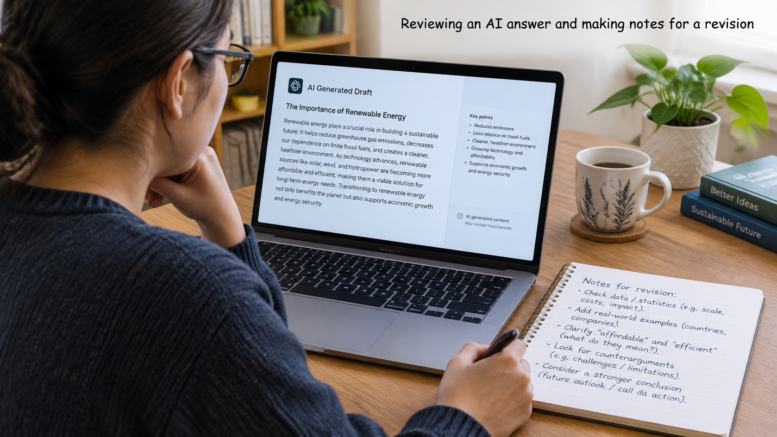
Quick Take: If an AI answer misses the mark, don’t assume you need a different tool. Explain what you need, give the AI the details that matter and ask for a specific change. Check the result before using it. When an approach works, save it for next time.
If you want to get better answers from AI, you don’t need complicated prompts or a different tool. Start by explaining what you need, giving the AI the details that matter and asking for a specific change when its first answer misses the mark.
I use AI tools a lot these days.
Sometimes the answer is useful straight away. Other times, I read it and think, “That’s not quite what I meant.”
I’ve found that the problem is often not the tool. It’s that I had something quite specific in mind but had not explained it clearly enough. The AI had to guess.
A useful way to get better answers from AI is to treat the first response as a starting point, not the finished job. Give the tool a clear brief, look at what comes back, then guide it towards the answer you actually need.
You don’t need to learn a complicated system to do that. A few simple habits can make a real difference.
Why It Can Be Hard to Get Better Answers from AI
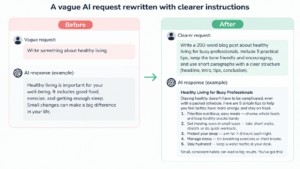
A short request can leave a lot of room for guesswork.
Imagine asking:
Write a welcome email for my customers.
The AI does not know what you sell, who your customers are or what you would like them to do after reading the email. It might produce a tidy response, but it has to make assumptions about the important details.
The result may sound fine but still feel wrong. Perhaps it is too formal, too long or full of phrases you would not use. It may even include details that are not true for your business.
That does not mean AI is useless.
It means the tool needs a clearer idea of the job.
Think of asking someone to “do something with the kitchen”. They would probably ask what you want changed, what needs to stay and what you want the finished kitchen to look like. Without that information, they would have to guess.
AI works in a similar way. The clearer the task, the less it has to guess.
Decide What You Want to Get Back
Before you type a request, pause and ask yourself:
What do I want to have when this is finished?
It sounds simple, but it helps turn a general request into something the AI can work on.
A request like “help me with my business” could lead to advice about marketing, planning, customers, websites and social media all at once. That may be interesting, but it might not help with the task you need to do today.
Try describing the result instead:
- I need a short email thanking someone for downloading my guide.
- I need five names for a beginner-friendly course.
- I need a plain-English explanation of a business term.
- I need an outline for a blog post.
- I need a list of questions to ask a supplier.
You do not have to know every detail before you start.
Sometimes you are using AI to help you think something through. If that is the case, say so:
I’m not sure which approach is best yet. Give me three possible directions, explain the difference between them and ask which one I want to develop.
That is better than pretending you have already made a decision. It also gives you a sensible next step.
Give the AI Useful Context
You don’t need to tell the AI everything about yourself or your business. Just include details that could change the answer.
Depending on the task, that might be:
- Who the result is for
- What you want the result to achieve
- What has already happened
- What information the AI should use
- Any important details it must not assume
For example, if you need a product description, you could write:
I run a small online shop selling handmade notebooks. Write a short description for an A5 lined notebook aimed at people who like to plan their week on paper. It is easy to carry in a bag. Do not say it is made from recycled paper, because I have not confirmed that.
The AI now knows what the product is, who it is for and what it should not claim.
If it helps, put your details in a short list:
Product: A5 lined notebook
Audience: People who plan their week on paper
Main benefit: Easy to carry in a bag
Confirmed detail: Lined pages
Do not claim: That it is made from recycled paper
If you want to get better answers from AI, it helps to share the information that affects the result—but there is no need to add detail just for the sake of it. A clear, short brief is often more helpful than a long explanation with the important points buried in it.
Set Clear Limits and Describe the Format
It helps to say what you want the answer to look like.
For example, instead of asking:
Explain email marketing.
You could say:
Explain email marketing to a beginner in about 200 words. Use plain English and include one everyday example.
Or, if you need ideas:
Give me five ideas in a numbered list. For each one, add a short explanation and one possible drawback.
You can also specify tone and length:
Write a friendly but professional email. Keep it under 150 words and end with one clear next step.
These details give you something to check. If you ask for five ideas, you can see whether you received five. If you ask for a short email, it is easier to spot when the answer has turned into a long sales letter.
There is no need to put every possible instruction into one prompt. Too many instructions can pull in different directions. “Make it very short, detailed, funny, formal and persuasive” may not give the AI a clear priority.
Think about what matters most for this particular job. You can always ask for another version if you want to change the tone or length.
My previous post went into more detail on how to write better prompts, see the post here
How to Get Better Answers from AI, Step by Step
The first answer does not have to be perfect. In fact, it often gives you a useful starting point for working out what is missing.
Read the response and ask yourself:
- Is the main idea right?
- Is the tone right?
- Is it too long or too short?
- Is anything important missing?
- Has the AI included something I did not ask for?
- What is the one change that would make this more useful?
Then ask for that change directly.
For example, instead of saying:
Make it better.
Try:
- “Keep the main idea but make it less formal.”
- “The examples are too general. Make them about a small online shop.”
- “Shorten the opening and keep the three practical tips.”
- “The second suggestion is too expensive for a beginner. Give me a lower-cost option.”
- “Keep the structure, but remove claims that are not supported by the information I gave you.”
A specific follow-up tells the AI what to work on. It also helps you keep the parts you already like.
You can tell the AI what is working, too:
The structure is useful and the first example is relevant. Keep both. Rewrite the final paragraph so it ends with one practical action.
This is one of the simplest ways to get better answers from AI. You do not need to start again just because one part of the response is not quite right.
If you cannot explain what is wrong, describe how the answer feels:
This feels too broad because it could apply to any business. Ask me three questions that would help you make the advice more specific.
That gives the AI a chance to gather the information it needs before trying again.
Break Bigger Tasks into Smaller Steps
For a small task, one request may be enough. For a larger job, it can be easier to work through the task in stages.
A blog post is one example. Instead of asking for an entire article straight away, you could:
- Ask for a few possible angles.
- Choose the angle that suits your readers.
- Ask for an outline.
- Check whether the sections cover the right points.
- Ask for a first draft.
- Review it and request specific changes.
- Check facts, examples and links before publishing.
This gives you a chance to change direction early. If the outline is not right, it is much easier to fix than a full draft.
The same idea works for other jobs. For a presentation, decide on the main message before asking for slide content. For a plan, say what the plan needs to achieve before asking for actions. For a customer email, decide on the purpose and the next step before asking for the wording.
It is a bit like planning a journey. If you know where you want to go, you can decide on the route. If you set off without a destination, you may end up somewhere interesting—but not necessarily where you wanted to be.
Check the Answer Before Using It
AI can produce an answer that sounds confident but is wrong, incomplete or unsuitable for your situation. I treat the response as a draft or a starting point, not as a fact just because it is neatly written.
Before using an answer, ask yourself:
- Does it answer the question I asked?
- Are the names, dates, figures and claims correct?
- Has it added anything I did not tell it?
- Does the tone suit the person who will read it?
- Is anything important missing?
- Does it make a promise I cannot support?
You can ask the AI to help identify things that need checking:
Review the answer above. List any factual claims, dates, figures or assumptions I should verify before using it. Do not add new claims.
That can be a useful extra step, but it is not a replacement for checking things yourself. The tool might miss something or make another mistake.
For important medical, legal, financial or safety questions, check reliable sources or speak with a qualified professional. Do not rely on an AI answer alone.
And if you are using the answer in something public, read it in your own voice. It may be clear, but it still needs to sound like you and reflect what you actually believe.
Save Prompts That Work
When you find a request that produces a useful result, save it. There is no need to start from scratch next time.
You can make a simple template by leaving spaces for the details that change:
Write a [type of content] for [audience]. The purpose is to [goal]. Include [key details]. Keep the tone [tone] and the length to about [length]. Do not [important limit]. End with [next step].
For a product description, it might look like this:
Write a product description for [product] aimed at [audience]. Focus on [main benefit] and include [confirmed details]. Keep it around [word count] words and use a [tone] tone. Do not claim [unconfirmed feature].
Keep your templates in a document, notes app or simple spreadsheet. You could organise them by task: emails, product descriptions, planning or blog posts.
It can also help to add a short note about what worked. For example: “Useful for a first draft” or “Remember to include the reader and the goal.” That way, you are not just saving the prompt—you are making it easier to use well next time.
A Simple Example from Start to Finish
Imagine you want to email people who downloaded a free checklist but have not used it yet.
You could start with:
Write an email about my checklist.
That does not tell the AI who downloaded it, what the checklist helps with or what you want the reader to do.
Try this instead:
Write a friendly email to someone who downloaded my online business checklist. Encourage them to choose one item and spend 15 minutes working on it today. Keep it under 150 words. Avoid pressure or exaggerated promises.
Now the AI has a reader, a purpose, a tone, a length and a clear next step.
Suppose the answer is useful but a little too formal. You could follow up with:
Keep the short length and the main idea. Make the tone more conversational, and add one sentence explaining that a small step is easier to fit into a busy day.
When you get the revised answer, check that it describes your checklist accurately and sounds like something you would send. If it does, save the prompt as a template. Next time, change the details to fit the new resource or action.
That is the process: give the AI a clear request, make a specific change and check the result before using it.
A Simple Checklist for Your Next AI Request
Before you send your next request, check whether you have included the details that matter:
- Task: Have I said what I want the AI to do?
- Purpose: Have I said what the result is for?
- Context: Have I supplied the background that could change the answer?
- Audience: Have I said who the result is for, if that matters?
- Format: Have I described the length or structure I need?
- Limits: Have I said what the AI should avoid assuming?
- Review: Have I checked the result before using it?
You will not need every point for every task. A quick question may only need a line or two. A customer email, article or product description may need more detail.
Use the checklist as a reminder, not as a set of rules you must follow every time. If an answer misses the mark, work out what was missing and add that in your next instruction.
Start with One Small Improvement
You do not need clever formulas to get more from AI. Decide what you need, give the tool the details that matter and say what you want the answer to look like.
If the first answer is not quite right, ask for a specific change. Then check the result before you use it. When you find an approach that works, save it.
If you want to get better answers from AI, start with a task you already have to do. Try explaining the result you need, adding one or two important details and asking for a focused change if the first answer misses. That is enough to get going.
For a fuller introduction, take a look at my guide to writing better AI prompts. You can also explore my free AI Starter Kit, which introduces seven simple principles and includes a Prompt Planner, a checklist for reviewing answers and a one-page summary.
There is no need to take my word for it. Have a look and see whether it helps with the way you use AI.
Want to take a look?
Leave a comment